Why it is called ChannelOS.tv
Every other name in this category is about the screen. This one is about the feed, and the difference is not branding. Here is what changes when a channel is the thing you manage instead of a list of devices.
Six tabs open, all of them signage products, and every name in the row says the same noun: screen, display, sign, a cloud for screens. Then one that does not mention a screen anywhere, and before you sign up for anything you would like to know whether that is a marketing flourish or a different thing being sold.
It is the second. ChannelOS is digital signage built around the channel rather than the screen: a channel is a named feed with a daily schedule, a television tunes into it, and the OS is the layer underneath that makes twenty televisions behave like one system instead of twenty devices you have to go and visit. The name is an argument about what you spend your time managing, and it is what makes the other three lessons in this track make sense.
What is ChannelOS?
It puts what a business sells on a TV it already owns. The television’s own web browser is the player, so there is nothing to buy and nothing to install. Open play.channelos.tv on the set and it shows a six-character code and a QR code. Scan the QR with your phone or type the code, and that screen is yours.
After that there are three nouns. A show is the slides. A channel is a named feed with a real daily timeline. A screen is a paired television tuned to a channel. What any screen is displaying is worked out from the show plus the channel’s schedule, live, rather than copied onto the set. How ChannelOS works walks those three pieces mechanically. This page is about why the middle one gives the product its name.
What is a channel, and why is it the unit instead of the screen?
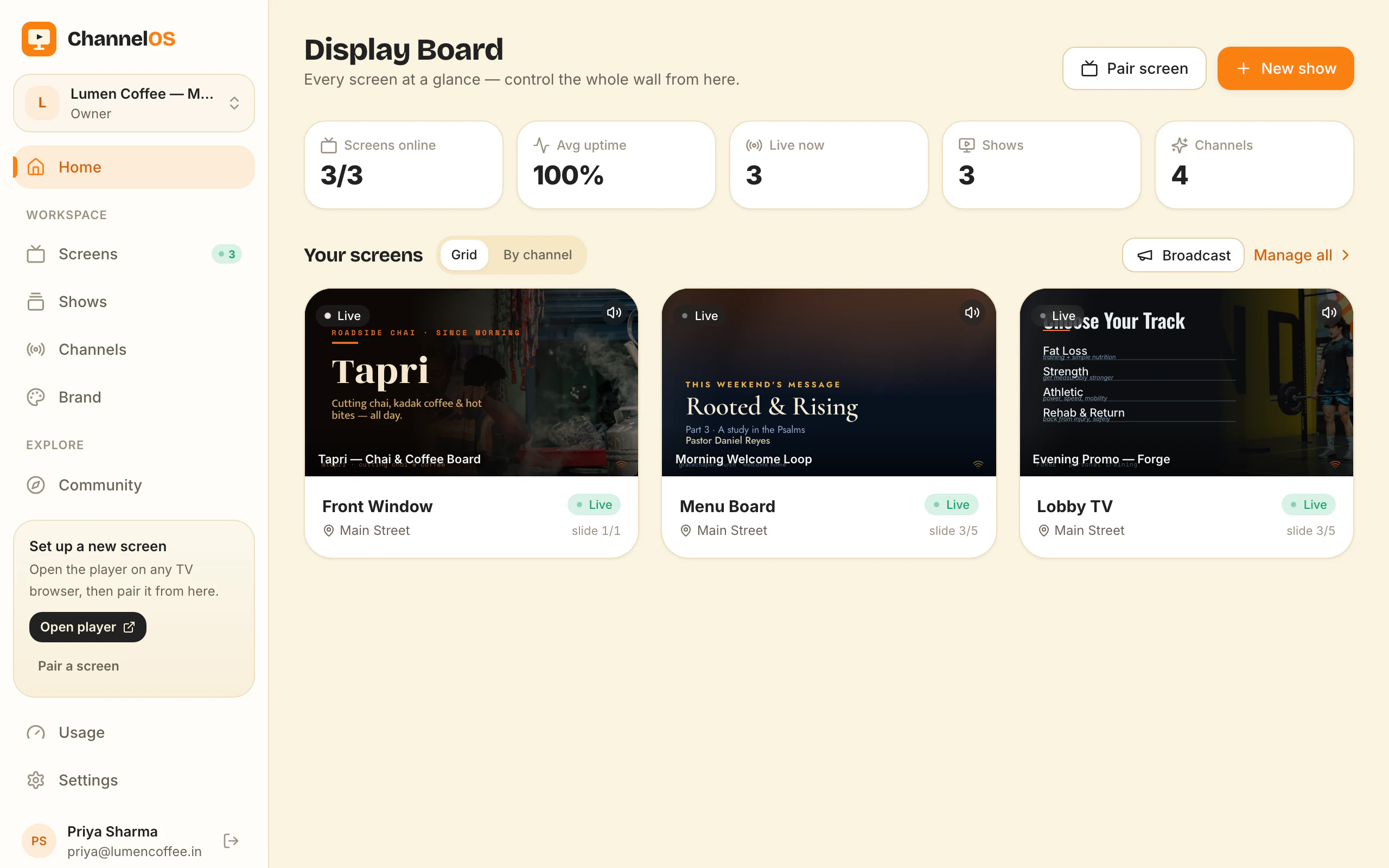
Most of this category treats the screen as the unit of work, and you can read that straight off the vocabulary: devices, players, provisioning, a licence per screen, device groups, sync status. The dashboard is a list of machines. Work therefore arrives as a job per machine, a wall of twenty screens is twenty small jobs, and the honest answer to “what is screen 14 showing right now” is “let me go and check”.
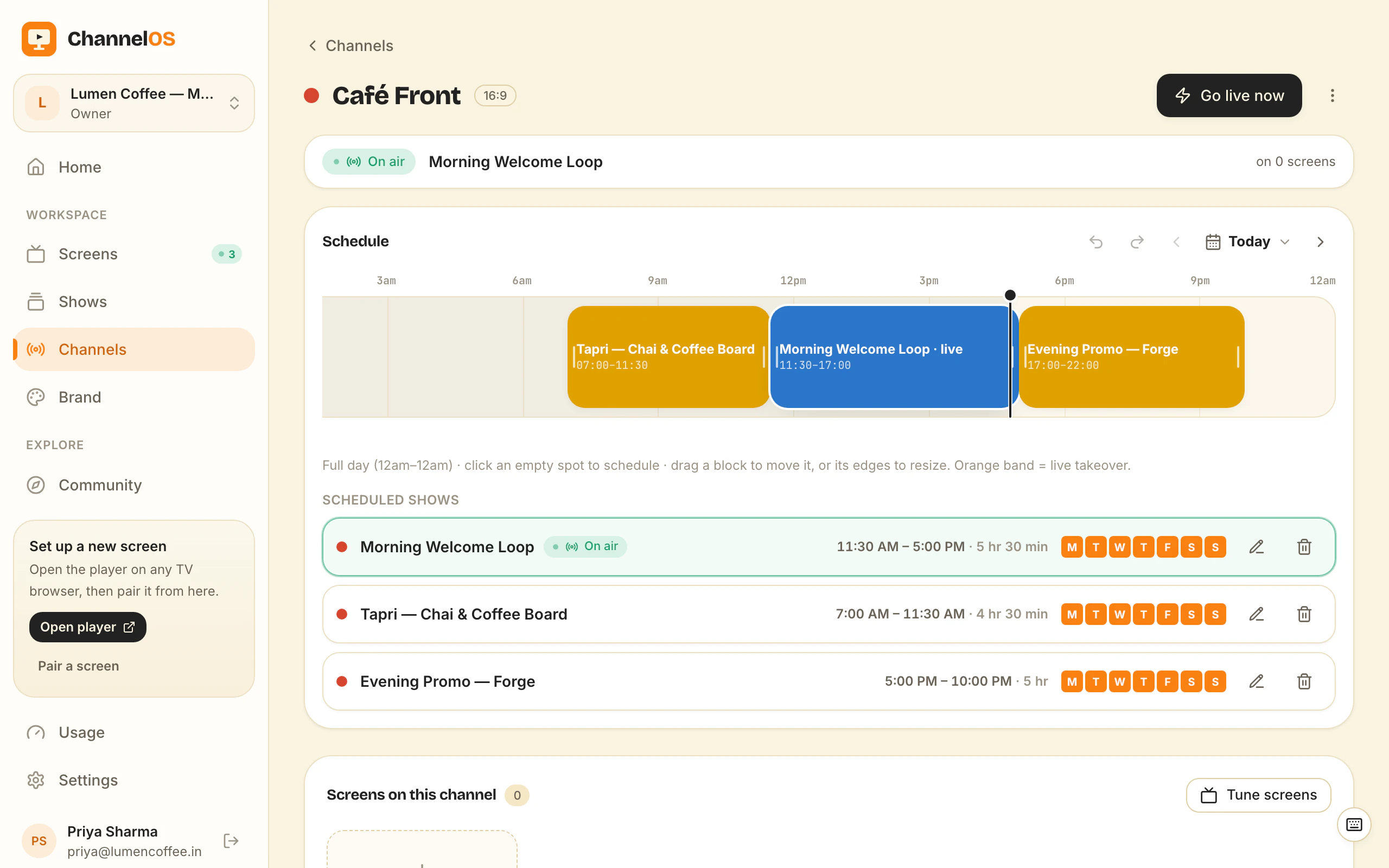
Broadcast television never worked that way. The channel is the unit. The schedule belongs to the channel. A set tunes in, and nobody in the gallery knows or cares how many sets are tuned to it, because the count is not something the gallery operates on. You change the channel and the sets follow.
ChannelOS takes that literally. A channel here is a named feed with a full day’s timeline from 12am to 12am and a tab per weekday, with shows placed as blocks that each carry a time range and a repeat rule: Once, Weekly by weekday, or Date range. A screen holds nothing but the address of the channel it tuned into.
Worth saying early, because the rest of this page argues for the model: channels and scheduling start on the Solo plan, not the free one. On free you publish a show straight to its single screen instead.
What does that actually change about the work?
Three things, and they are the only reason the model is worth the words:
Adding a screen is a pairing and a choice, not a provisioning job. Open the browser on the new television, scan the code, pick the channel it should tune to. Nothing to image, nothing to sideload, no licence to assign, and nothing on the new screen to keep in step with the old ones. Screen twenty is the same job as screen one.
An edit is a change to the feed, not a deployment. Correct a price in the show and every screen tuned to a channel airing it is already right. There is no publish step to remember and no per-device sync to watch. That is the one mechanism on this page worth testing rather than believing: change the show on your phone, then look at the wall.
The wall reads as a gallery rather than an inventory. Every paired screen sits on one Display Board with a live rendered preview of what it is really showing, its live status, and one-tap controls: play, pause, blank, mute, next, and broadcast or takeover. The board can group by channel, so a row is a feed instead of a pile of serial numbers. The realtime layer underneath is Cloudflare Workers and Durable Objects, which is why pressing blank reaches the glass straight away rather than at the next poll.
A takeover is the same idea at its conclusion: a sanctioned cut-in that overlays the schedule for as long as it runs, then hands the channel back with nothing to undo. You interrupt the feed, not each screen.
Why “OS” rather than “app” or “CMS”?
Because the claim is about the layer, not the editor. A CMS holds content and hands it to something else to display. The interesting part of this product sits underneath the editor: it resolves which show a given screen should be airing this minute, keeps that answer current on every tuned set, carries presence and status back, and accepts commands addressed to a channel instead of to a machine. That is a scheduling and resource layer with televisions as its clients, and OS is the shortest honest word for it.
It is a claim with a boundary: there is no kernel here, nothing is installed on the television, and ChannelOS does not touch the set’s firmware. The operating system on your TV is still the TV’s own. OS describes the layer that coordinates a wall of them.
The .tv is the smallest part of the name and the most literal. It is where the model came from, and it is the address the player lives at.
How is it different from Yodeck and the rest?
The visible difference is the hardware, because there is no player box: the television’s browser is the player. The structural difference is this unit-of-work question. A device-centred tool is good at telling you about devices, which is exactly right for an AV team with a fleet to account for. A channel-centred tool is good at telling you what is on air, which is what somebody running a shop wants to know.
The closest comparison is written out properly in ChannelOS vs Yodeck.
Who is this the wrong answer for?
Three cases, and all three are real.
An estate that has to run islanded. A broadcast model asks for a working network. A screen that is already playing keeps playing when the wifi drops, and it holds the show’s pictures and clips in the browser’s own storage so they are not re-fetched every loop. But the page and the show are fetched fresh whenever a screen starts, so after a power cut it needs the connection back before it can come up again. If a screen must survive a long outage entirely on its own, a vendor who sells a media player with local storage is the better answer, and that is a genuine reason to buy hardware.
A team measured on devices. If the requirement is proof-of-play reporting, per-device audit trails, or sealed single-purpose kiosk hardware in a place the public can physically reach, buy the device-centred product. It is built for that and this is not.
Anyone who has not paired a screen yet. None of this is an insight you need before the first board goes up. Channels and scheduling are Solo and up: $5 per screen per month billed annually ($60 a year), or $6 monthly. The free plan is one screen, permanently, and publishes a show straight to it instead. A free screen carries a ChannelOS banner along the bottom, and about every two minutes that banner opens into a full ChannelOS slide for roughly 30 seconds naming what ChannelOS is and the channelos.tv address, then folds back. Any paid plan removes both.
No plan is unlimited, either. Solo and Pro run up to 99 paired screens; Agency includes 25 and runs to 999.
What should I do next?
With one screen, the channel is something to read about later, and getting something on the glass today is the lesson you want instead. With two, the argument on this page stops being philosophy: how to show the same thing on many TVs at once is where you point both at one feed and find out whether one edit really does reach both.
Frequently asked questions
- What is ChannelOS?
- ChannelOS puts what a business sells on a TV it already owns. The television's own web browser is the player, so there is no media player box to buy and nothing to install: you open play.channelos.tv on the set, and it shows a six-character code and a QR code. Scan the QR with your phone or type the code, and that screen is yours. You then build shows, program them onto a channel, and run every paired screen from one live board.
- What is a channel in digital signage?
- A channel is a named feed with a real daily timeline, running 12am to 12am with a tab per weekday. You place shows on it as blocks, each with a time range and a repeat rule, and a screen tunes into the channel rather than holding any content itself. It is the broadcast equivalent of a television channel: the schedule belongs to the feed, and any number of sets can be tuned to it.
- How is ChannelOS different from other digital signage software?
- Most of the category treats the screen as the unit of work, so the dashboard is a list of devices and a wall of twenty screens is twenty small jobs. ChannelOS treats the channel as the unit: you program a feed, screens tune in, and what each one shows is worked out live rather than copied onto it. The visible consequence is that there is no player box and no publish-then-sync step.
- Is ChannelOS actually an operating system?
- Not in the kernel sense, and it is worth being plain about that. Nothing is installed on the television and the set keeps its own firmware. The OS in the name describes the layer that decides which show a given screen should be airing this minute, keeps that answer current on every tuned set, and accepts commands addressed to a channel instead of to a machine.
- Who is ChannelOS for?
- People for whom the screens are a second job rather than anybody's department: a cafe, a gym, a salon, a clinic, a school reception, a dealership, a church hall. It suits connected screens that change often and are run from a phone. An AV team that is measured on device audit trails and proof of play is better served by a device-centred platform.
- Why does the name end in .tv?
- Because broadcast television is where the model comes from, and because it is the address the player lives at. You open play.channelos.tv in the TV's browser to pair a screen. Marketing links and the operator app both live on channelos.tv.
Further reading
Do it on a real screen.
Open the player on the TV, scan the code with your phone, and publish a show. Your first screen is free.
Free screens show a ChannelOS banner, and about every 2 minutes it opens into a full ChannelOS slide; any paid plan removes both.