ChannelOS vs Xibo (Xibo Signage / Spring Signage Ltd): the Xibo alternative with no player app
A Xibo alternative that needs no player app: an honest comparison of ChannelOS and Xibo on pairing, AI-drafted shows vs hand-built layouts, and edit-once scheduling.

Xibo (Xibo Signage / Spring Signage Ltd) is a genuinely open-source digital-signage CMS with deep, professional scheduling — and if your team is comfortable self-hosting a server and managing player devices, it’s a strong, low-cost choice. ChannelOS is for the person on the other side of that plumbing: you have a TV, you do not have a server, and the artwork is the part that never gets done. If you are shopping for a Xibo alternative, this is an honest look at where the two diverge — and at who should stay exactly where they are.
A Xibo Alternative That Needs No Player App
Switch if the CMS server and the per-device player apps are costing you more time than the screens are worth; stay on Xibo if you need to own the infrastructure. Most people looking for a Xibo alternative aren’t unhappy with Xibo’s features — they’re unhappy with the plumbing around them: a web and database server to patch and back up, a player app to sideload and re-license on every device, and a layout editor that assumes somebody on the team can design.
Who should switch. Single-site and small-multi-site operators — cafés, salons, clinics, gyms, showrooms, dealerships — who inherited a Xibo install from an integrator and now maintain it themselves. Teams paying commercial Android, Tizen or webOS player licences for a handful of screens. Anyone whose real bottleneck is that nobody has the time to build layouts region by region: ChannelOS drafts a complete, on-brand multi-slide show from one sentence, or from a PDF, image or webpage URL you already have, and the templates gallery covers the rest. And anyone who never touched DataSets, geo-scheduling or the API — that describes most small Xibo installs, and it’s exactly the depth you’re paying for in maintenance.
Who should not switch. If you have an on-premise or air-gapped requirement, or a site whose network drops daily, stay put: Xibo’s players cache content locally and keep playing through an outage, while a browser-based screen needs a working connection. If you sell DOOH advertising and bill against automated play-count campaigns, Xibo’s scheduler is deeper than ours and we don’t pretend otherwise. If anything is wired into Xibo’s API or DataSets, or you’re an integrator running a hundred screens off one self-hosted CMS, both the maths and the control favour staying.
What you give up. Self-hosting and full data ownership. The AGPLv3 source and the freedom to fork it. Offline local caching. Geo-scheduling and automated play-count campaigns. Those are real losses, and for a technical team they may outweigh everything below.
What you get back. No server to run, patch or restore. No player box and no per-device player licence — the TV’s own browser is the player, which is the whole argument in no media player required and digital signage without an Android player. AI drafts the show instead of you assembling it. And an edit is derived by every screen in real time rather than published and synced. The first screen is free, and additional screens are per screen per month on the pricing page.
Do I need a media player or device for Xibo (Xibo Signage / Spring Signage Ltd)?
With Xibo you install a native player app on a device you provide; with ChannelOS the TV’s own browser is the player, so there’s nothing to install. Xibo doesn’t sell a media-player box, but it isn’t browser-based either — it distributes dedicated player software per platform (Xibo for Windows, Android, Samsung Tizen and LG webOS, plus Linux and ChromeOS) that downloads content from the CMS and plays it locally. The Windows player is free and open-source; the Android, Tizen and webOS players are commercial and need a paid Xibo Software Licence per device.
ChannelOS runs as a web page in the TV’s own browser — Android TV, Google TV, webOS, Fire TV or a browser on an HDMI stick, even a laptop in kiosk mode. You open play.channelos.tv on the screen, scan the on-screen code from your phone, and it’s live in about two minutes. No box, no per-device licence.
Why it matters: Xibo’s local caching gives you reliable offline playback, but it also means provisioning and updating a player app on every device. With ChannelOS the “player” is already on the TV.
Can AI build the whole show, or do I design every slide?
Xibo has no AI, so every layout is built by hand; ChannelOS drafts the whole multi-slide show from a short description. Xibo’s editor is a mature layout/region/timeline tool — you assemble regions, playlists and widgets manually from media you’ve uploaded. There is no generate-from-a-prompt feature, no AI images, copy or layout assist anywhere in the product.
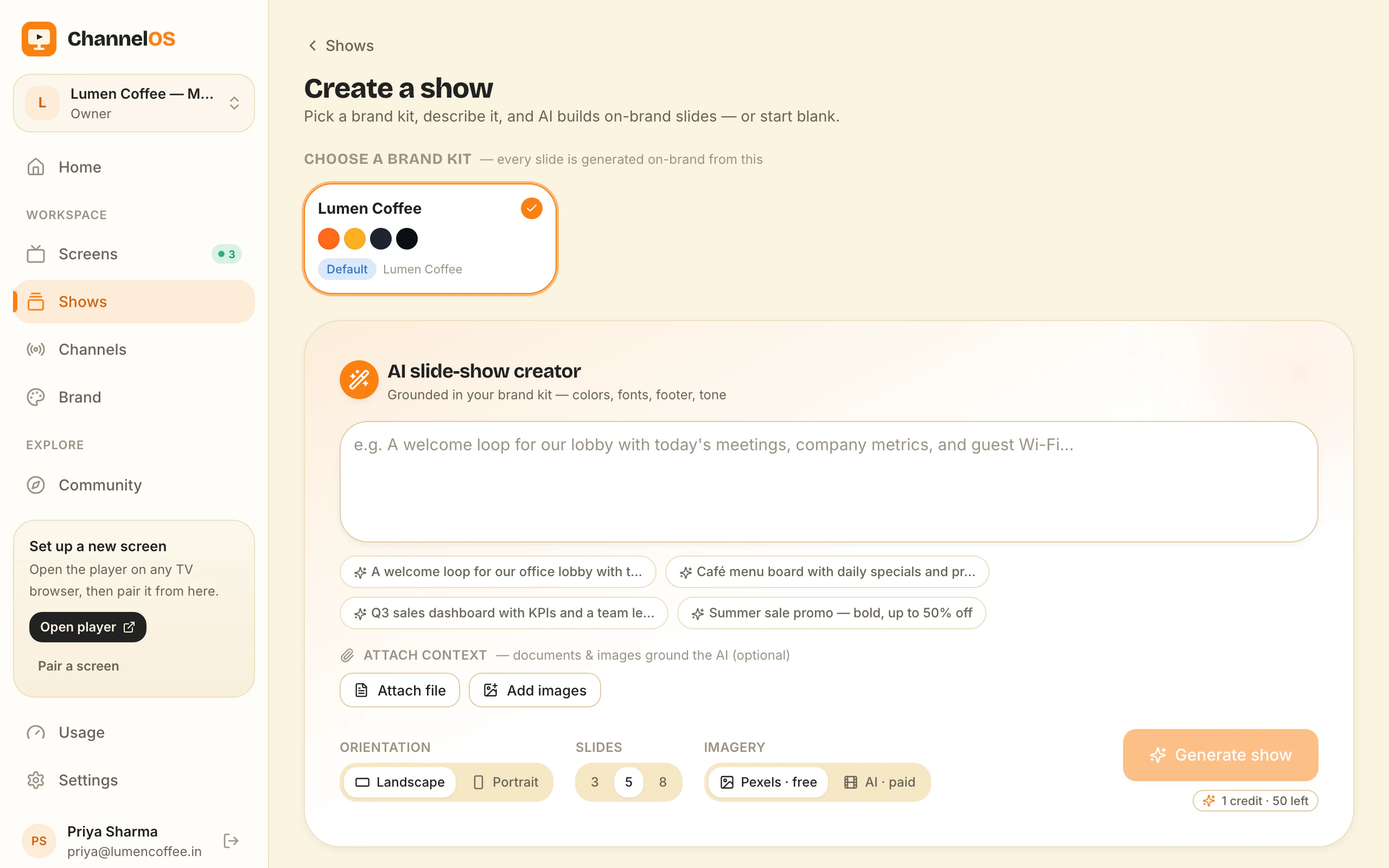
With ChannelOS you pick a subject, goal and look from chips — no prompt-writing — and AI drafts a complete, on-brand, multi-slide show. It can read attached PDFs, images and a webpage URL straight into slides. The result is a real, editable show in a Canva-style editor, not a flat export: every element is selectable, with one-tap background removal and live clock, weather and QR widgets.
Why it matters: most people don’t have a designer or the time to learn a timeline editor. Description-first creation means the first draft exists before you’ve made a single layout decision.
How fast do changes reach every screen?
Xibo has excellent scheduling but content is published to players that sync on their own schedule; ChannelOS derives what plays live, so an edit airs everywhere the moment you save. Xibo’s scheduling is a real strength — calendar events, named dayparts, recurring and priority campaigns, geo-scheduling, and automated ad-campaign play-count scheduling. It’s one of the most capable schedulers in signage.
ChannelOS is schedule-first too: what a screen shows is derived from the show, the channel schedule and the clock in real time. Edit once and it airs everywhere instantly — no publish-and-wait, no per-device sync. Channels support dayparting (different content by hour and weekday/weekend, set once) and a live takeover that drops an urgent message on every screen, then resumes the schedule.
Why it matters: a typo on the lunch menu is fixed on every screen the moment you save it — there’s no build-and-distribute step between you and the wall.
What does Xibo (Xibo Signage / Spring Signage Ltd) cost vs ChannelOS?
Xibo’s self-hosted CMS is free under AGPLv3 but you run the server and license commercial players per device; ChannelOS gives a free first screen, then charges per screen per month with no hardware or player licence. Xibo has two models: self-host the open-source CMS for no per-screen software fee (you supply and maintain a web + database server), or use Xibo Cloud Hosting, a managed CMS billed per display — the official site advertises “as little as £3.50/month” per display, with higher tiers reported around £5.50 and £9.00 (approximate; not confirmed on Xibo’s own visible pricing page). Either way, the Android, Tizen and webOS players carry a separate per-device licence, and Cloud Hosting offers a 14-day trial rather than a permanent free tier.
ChannelOS keeps it simple: your first screen is free, then it’s priced per screen per month — no seats to count, no setup fees, no player hardware to buy and no per-device licence.
Why it matters: “free” software can still add up once you tally a server, backups, maintenance and per-device player licences. Count the whole bill, not just the CMS line.
Who should still choose Xibo (Xibo Signage / Spring Signage Ltd)?
Choose Xibo if you want to self-host, own your data and infrastructure, and avoid vendor lock-in — or if you run data-driven DOOH advertising. Xibo is genuinely open-source (AGPLv3) with an active community and public GitHub, broad player-platform support with offline caching, and deep scheduling including automated ad-campaign play-count targeting plus DataSets, RSS and ticker widgets for data-driven signage. For an IT-capable team, integrator or reseller that values control and low software cost, that’s a real, defensible fit.
ChannelOS is the opposite trade: it gives up self-hosting and hand-built control in exchange for speed and simplicity — AI drafts the show, the browser is the player, and one live board runs the wall.
| The job | Xibo (Xibo Signage / Spring Signage Ltd) | ChannelOS |
|---|---|---|
| Get a screen live | Provision a device, install a native player app, license it per device | Open one URL on the TV — scan the code, live in ~2 min |
| Make a show | Build layouts, regions and playlists by hand | Describe it — AI drafts every slide, then edit |
| Change what’s playing | Re-publish; players sync on their own schedule | Edit once — it airs everywhere instantly |
| Run the wall | CMS admin plus per-player management | One live board: play · pause · blank · mute · next |
| Setup before pixel one | Host a server (or trial cloud), provision players | None — pair and publish in minutes |
| Feature | Xibo (Xibo Signage / Spring Signage Ltd) | ChannelOS |
|---|---|---|
| Media-player hardware | No box sold; requires an installed native player app on your device | ✗ none — TV browser is the player |
| Free tier | Self-hosted CMS free (AGPLv3); cloud is 14-day trial only | ✓ first screen free, forever, with a ChannelOS banner along the bottom of the screen |
| AI drafts the full show | ✗ none | ✓ from a short description |
| Browser pairing (no app on TV) | ✗ installed player app per platform | ✓ scan a code, ~2 min |
| Edit once, airs everywhere | partial — published, players sync on schedule | ✓ derived live, instant |
| Dayparting / scheduling | ✓ deep — dayparts, campaigns, geo | ✓ dayparting + live takeover |
| Pricing model | Free self-host + per-device player licence, or cloud per display | Per screen / month, no hardware |
So which should you choose?
Choose Xibo if you have the technical resources to self-host, you want to own your data and infrastructure with no vendor lock-in, and you need its deep, mature scheduling — especially for data-driven or DOOH advertising where automated play-count campaigns matter. It’s a serious, open tool for people who want control and are happy to run the plumbing.
Choose ChannelOS if you want screens live fast, built by AI, and run from your phone — with no server and no setup before your first show. Your first screen is free. The test: run one board for a week without touching a terminal. If you miss the control, Xibo is still there and costs nothing but your own server.
Frequently asked questions
- What's the main difference between ChannelOS and Xibo (Xibo Signage / Spring Signage Ltd)?
- Xibo is an open-source signage CMS that plays content through an installed native player app on each device, with layouts built by hand. ChannelOS runs as a web page in any TV's own browser, drafts the whole multi-slide show with AI, and derives what each screen shows from a live schedule. Xibo suits technical, self-hosting teams; ChannelOS suits non-technical operators who want a screen live in minutes.
- Does ChannelOS need a media player or player app like Xibo (Xibo Signage / Spring Signage Ltd)?
- No. ChannelOS runs in the TV's own browser — Android TV, Google TV, webOS, Fire TV or a browser on an HDMI stick — with nothing to sideload and no per-device player licence. Xibo requires an installed native player app (Windows, Android, Samsung Tizen, LG webOS, Linux, ChromeOS), and the Android/Tizen/webOS players are commercial and licensed per device.
- Is ChannelOS cheaper than Xibo (Xibo Signage / Spring Signage Ltd)?
- It depends on how you count. Xibo's self-hosted CMS is free forever under AGPLv3, but you supply and maintain the server, and commercial Android/Tizen/webOS players carry a per-device licence; Xibo Cloud Hosting starts around £3.50 per display per month. ChannelOS gives you a free first screen, then charges per screen per month with no player hardware, no per-device licence and no server to run. Free screens show a ChannelOS banner along the bottom of the screen, and any paid plan removes it.
- Who should still use Xibo (Xibo Signage / Spring Signage Ltd)?
- Technical teams that want to self-host, own their data and infrastructure, and avoid any per-screen software fee — plus DOOH advertisers who need automated ad-campaign play-count scheduling and data-driven widgets — are genuinely well served by Xibo. ChannelOS is for people who want an AI-drafted screen live in minutes without running a server.
- What is the best Xibo alternative?
- It depends on what you were using Xibo for. If you need self-hosting, offline local caching or data-driven DOOH campaigns, nothing beats Xibo itself and you should stay. If you want the same screens without a CMS server or an installed player app, ChannelOS is the closest browser-based Xibo alternative: it runs as a web page in the TV's own browser, drafts a complete multi-slide show with AI from one sentence or an existing PDF, and derives what each screen plays from a live schedule. The first screen is free, then it's priced per screen per month. Free screens show a ChannelOS banner along the bottom of the screen, and any paid plan removes it.
- How hard is it to switch from Xibo to ChannelOS?
- There is no Xibo importer, so existing Xibo layouts don't transfer — but you rarely rebuild them by hand. You point ChannelOS's AI at the same source material you built them from (a PDF menu, a price list, images or a webpage URL) and it drafts a complete on-brand show you then edit. Pairing each screen takes about two minutes: open the player URL on the TV and scan the code from your phone, with no per-device licence to move. Because a ChannelOS screen is paired rather than provisioned, you can run both systems side by side and leave the Xibo CMS up until you're satisfied.
Your screen is two minutes away.
Open the player on a TV, scan the code, publish a show. Your first screen is free.
Free screens show a ChannelOS banner along the bottom of the screen, and any paid plan removes it.