ChannelOS vs Yodeck: a Yodeck alternative with no player hardware
An honest ChannelOS and Yodeck comparison, and a Yodeck alternative that needs no player hardware — getting a screen live, building shows, running the wall, and who should switch.
Yodeck is a capable, well-established digital-signage platform. If you have an AV team and you want fine-grained control over a fleet of dedicated player devices, it does that job well. Most people searching for a Yodeck alternative aren’t unhappy with the software at all — they’re unhappy that every screen needs a player box, a licence and somebody to provision it.
ChannelOS is for the person on the other side of that provisioning step: you have a TV on the wall, a price that changed this morning, and nobody whose job it is to update the screen. This is an honest look at where the two diverge.
Getting a screen live
Yodeck: provision a Yodeck player (or certified device), register it, license it per screen, then connect it to your account.
ChannelOS: open one URL on the TV’s browser. It mints a screen and shows a code — scan it from your phone. no per-device player to buy.
Why it matters: the gap between “I have a TV” and “it’s showing my content” is minutes, not a hardware order.
Building a show
Yodeck: build playlists, layouts and zones by hand from a media library you’ve uploaded and tagged.
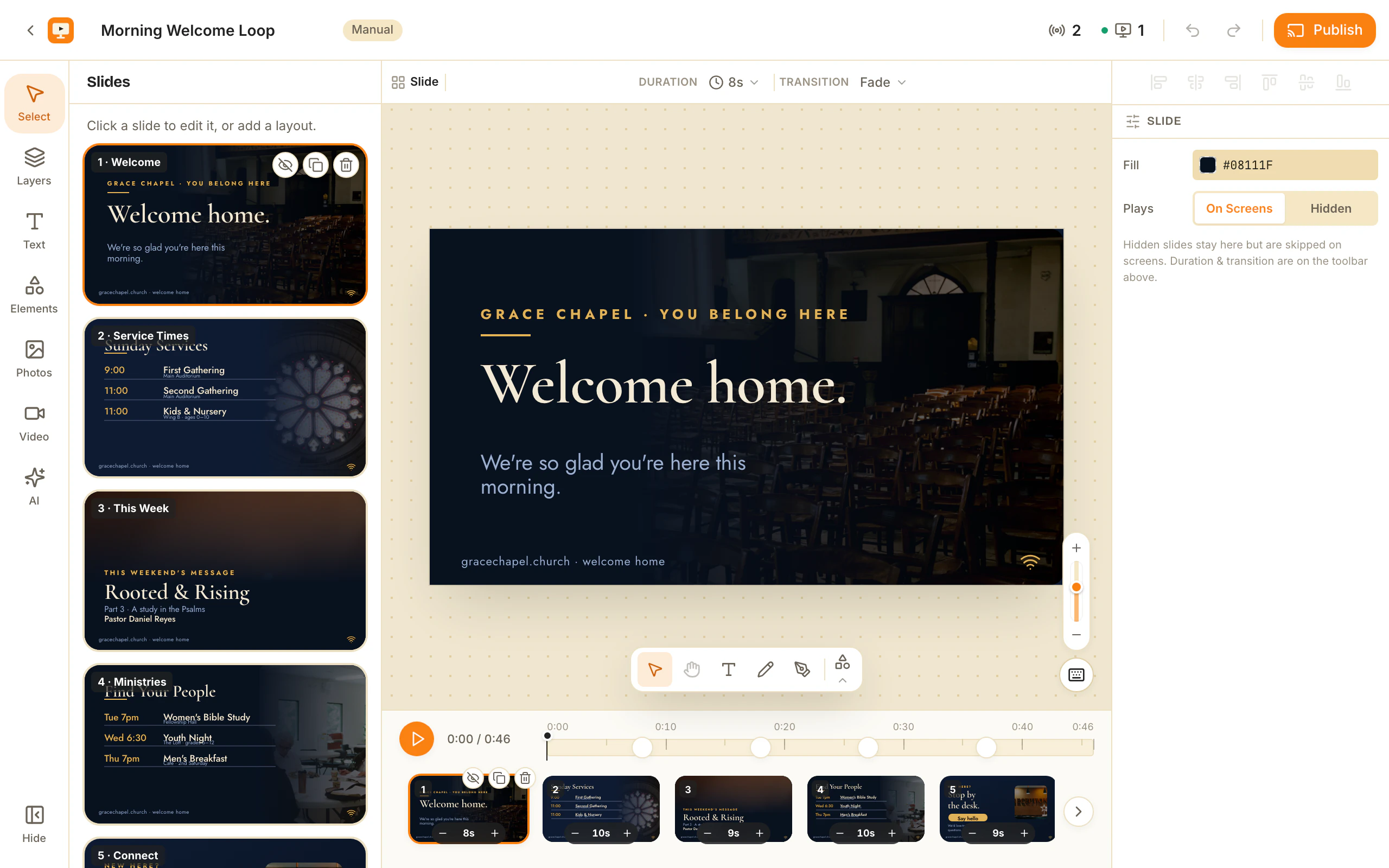
ChannelOS: describe the show and AI drafts every slide — on-brand, multi-slide, editable. Drop into a Canva-style editor for the last 10% when you want it.
Why it matters: most people don’t have a designer. Description-first creation means the first draft exists before you’ve made a single layout decision.
Changing what’s playing
Yodeck: edit, then re-publish and wait for devices to sync the new content.
ChannelOS: edit once and it airs everywhere instantly. What a screen shows is derived from the show and the channel schedule, in real time — there’s no publish-and-wait step.
Why it matters: a typo on the lunch menu is fixed on every screen the moment you save it.
Running the wall
Yodeck: per-device dashboards and menus to manage each screen.
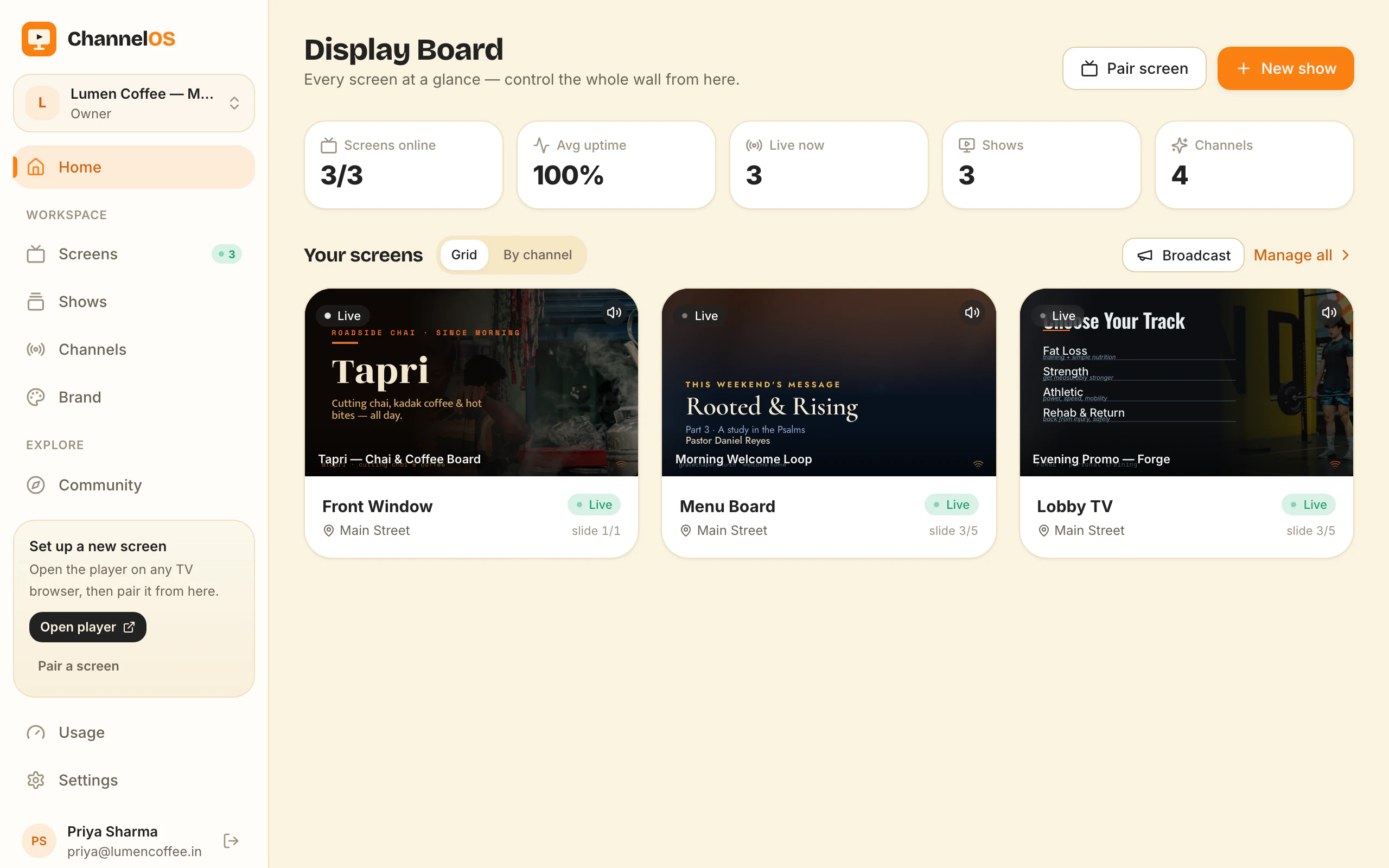
ChannelOS: one live board with a real rendered preview of every screen, pulsing live status, and one-tap controls — play, pause, blank, mute, next, hold — always live, so nothing drifts.
Why it matters: you glance once and know the whole wall is alive.
Setup before pixel one
| The job | Traditional signage (e.g. Yodeck) | ChannelOS |
|---|---|---|
| Get a screen live | Provision a device, install an app, license it | Open one URL on the TV — it mints a screen |
| Make a show | Build playlists, layouts, zones by hand | Describe it — AI drafts every slide |
| Change what’s playing | Re-publish, wait for device sync | Edit once — it airs everywhere instantly |
| Run the wall | Per-device dashboards and menus | One live board: play · pause · blank · swap |
| Setup before pixel one | Accounts, agents, media library, users | None — pair and publish in minutes |
The Yodeck Player, and what it costs in practice
The Yodeck Player is a small dedicated media-player box — the product grew up on Raspberry Pi hardware — that plugs into the TV’s HDMI port. It arrives preloaded, registers itself against your account, downloads your content and plays it from local storage. One box per screen.
That design buys Yodeck two genuinely good things, and they’re worth naming before the criticism. The first is offline playback: because the media sits on the device, a dropped connection doesn’t stop the screen, it keeps playing what it last downloaded. The second is hardware-level control: a device you own can be rebooted remotely, monitored, screenshotted and told to switch the panel on at open and off at close.
What it costs you isn’t only the sticker price of the box. It’s one box per screen, a licence attached to that screen, a physical thing to power and mount behind a wall-hung TV, a provisioning step before pixel one, a spare on a shelf for the night one dies, and a fleet that ages — a five-year-old player is a support ticket waiting to happen. Multiply by screen count and the hardware line tends to outgrow the software line.
ChannelOS has no equivalent product, deliberately. The TV’s own browser is the player: Android TV, Google TV, webOS, Fire TV, a Chromebox, or a laptop in kiosk mode. You open one URL on the screen, scan the code from your phone, and it’s paired — nothing to buy, provision, mount or licence per device. The mechanics are in no media player required, and signage without an Android player covers the odd-hardware cases.
The trade is real and we won’t hide it: a browser-based screen wants a working internet connection. A player with local storage rides out an outage better than a web page does. If your screens sit somewhere with genuinely unreliable Wi-Fi, that single difference outweighs everything else on this page.
A Yodeck alternative that needs no player hardware
If you’re shopping for a Yodeck alternative, the useful question isn’t which product has more features — Yodeck has more features. It’s whether the thing standing between you and a live, current screen is hardware or content.
Switch if it’s either of those. ChannelOS suits the single-site or few-site operator — a café, gym, salon, clinic, dealership, school reception, church hall — where the screens are somebody’s second job rather than anybody’s department. Pairing is opening a URL on the TV and scanning a code, so there’s no device order, no provisioning queue, no per-device licence and no box to hide behind the panel. And if the real reason a screen still shows last month’s promo is that nobody has time to design the next one, description-first creation matters more than any device feature: describe the show and AI drafts every slide, on-brand and editable, reading a PDF, an image or a webpage URL if you hand it one. If you’d rather not start from a blank sentence, the templates gallery and the free menu board maker both give you a finished board to edit.
Don’t switch if any of these is a hard requirement. Screens on unreliable connections, where a player’s offline cache is doing real work. Proof-of-play reporting, because you sell advertising slots and have to evidence them. Fleet-grade device management — remote reboot, panel power scheduling, per-device telemetry. A dependency on Yodeck’s third-party app library, such as a BI dashboard on the wall. Or an AV team that has already standardised on players and is happy: ripping out a working fleet to remove a licence line is not a good trade.
What you give up by switching, plainly: the offline cache, hardware-level control of the device, proof-of-play reports, that app library, and — if you already bought players — the money already spent on them. What you get in exchange: no hardware to buy or maintain, AI-drafted shows, a schedule every screen derives in real time so there’s no publish-and-wait step, and a first screen that’s free forever. After that it’s per screen per month, on the pricing page.
Nothing migrates automatically, and we’d rather say so than surprise you: Yodeck playlists don’t export into ChannelOS. In practice people move one screen across, rebuild that show in an afternoon — usually by describing it rather than rebuilding it by hand — and leave the players running the other screens until they’re convinced.
So which should you choose?
Choose Yodeck if you have AV resources and want maximal control over dedicated player hardware.
Choose ChannelOS if you want screens live fast, built by AI, and run from your phone — with no setup before your first show. Your first screen is free, so here is the test: put your real prices on one TV, then change one of them from your phone during a busy hour. If that takes more than a minute, we have not earned the second screen.
Frequently asked questions
- What's the main difference between ChannelOS and Yodeck?
- Yodeck is built around dedicated player hardware and a traditional CMS workflow (devices, media libraries, playlists, layouts). ChannelOS runs in any TV browser, drafts shows with AI, and is designed for non-technical operators rather than AV teams.
- Does ChannelOS need a media player device like Yodeck?
- No. ChannelOS runs as a web page on the TV itself — Android TV, Google TV, webOS, Fire TV or a browser on a stick. There is no separate player device to buy, provision or license per screen.
- Is ChannelOS cheaper than Yodeck?
- ChannelOS's first screen is free, then pricing is per screen per month with no seats to count or setup fees. Free screens show a ChannelOS banner along the bottom of the screen, and any paid plan removes it. Total cost also drops because there's no dedicated player hardware to purchase. Compare current plans on the pricing page for your screen count.
- Who should still use Yodeck?
- Teams who want deep, granular control over certified player hardware and have the AV resources to manage it may prefer Yodeck's traditional approach. ChannelOS is for people who want screens live fast without that overhead.
- What is the best Yodeck alternative?
- It depends on why you are leaving. If you want the same job done without the hardware, ChannelOS is the closest fit: it runs in the TV's own browser with no player box and no per-device licence, AI drafts a complete multi-slide show from one sentence, and every screen derives what it plays from the schedule in real time. If you need offline playback on unreliable connections, proof-of-play reporting or fleet-grade device management, a traditional player-based CMS — Yodeck included — is still the better answer. ChannelOS's first screen is free, so testing the fit costs nothing. Free screens show a ChannelOS banner along the bottom of the screen, and any paid plan removes it.
- How hard is it to switch from Yodeck to ChannelOS?
- There is no fleet to migrate, because there is no fleet: you open one URL in each TV's browser and scan the pairing code from your phone, so a screen moves across in about two minutes. Content does not transfer automatically — Yodeck playlists do not export into ChannelOS — but rebuilding is usually faster than porting, because you can describe the show and let AI draft the slides, upload the same PDF or images you gave Yodeck, or start from a template. Most people move one screen first, leave the Yodeck players running the rest, and switch the others once they are happy.
Your screen is two minutes away.
Open the player on a TV, scan the code, publish a show. Your first screen is free.
Free screens show a ChannelOS banner along the bottom of the screen, and any paid plan removes it.