ChannelOS vs NoviSign: no player app, AI drafts the show
An honest comparison of ChannelOS and NoviSign, and why ChannelOS is a NoviSign alternative with no player app: pair a TV in its own browser, let AI draft the whole show, and air edits everywhere at once.

NoviSign is a capable, well-established digital-signage platform with a deep catalog of widgets, integrations and interactive touch features. If you want an integration-rich CMS and have the resources to install and manage a player app across a fleet of devices, it does that job well.
ChannelOS is for the person on the other side of the install: the TV is already on the wall, and the thing standing between you and a useful screen is the design, not the device. This is an honest look at where the two diverge.
Do I need a media player or device for NoviSign?
NoviSign is bring-your-own-device but still requires installing a native NoviSign player app on each screen, while ChannelOS runs as a web page in the TV’s own browser, so nothing has to be installed before a screen goes live. NoviSign runs on standard players — Android TV, Chrome OS, Windows PCs, Samsung Tizen, LG webOS, BrightSign, and Fire TV (limited) — so you avoid a proprietary box, but each device downloads and maintains a per-OS player app that connects over HDMI and pulls from the cloud.
ChannelOS drops that step. You open play.channelos.tv on the TV, scan the on-screen code from your phone, and the screen is live in about two minutes — no per-device license to track, no OS-fleet to patch. Android TV, Google TV, webOS, Fire TV, a browser-on-a-stick or a laptop in kiosk mode all pair the same way.
Why it matters: the gap between “I have a TV” and “it’s showing my content” is a phone scan, not a per-device app install and maintenance plan.
Can AI build the whole show, or do I design every slide?
NoviSign’s AI generates single images from a text prompt, but you still design every slide by hand — ChannelOS’s AI drafts the entire multi-slide show for you. NoviSign’s AI Image Creator (a Business Plus and above feature, debuted at ISE 2025) makes one image at a time to drop into a playlist, and its MCP integration connects screens to external AI and data feeds — useful plumbing, but not a built-in show generator. The layout itself is still manual drag-and-drop in NoviSign Studio.
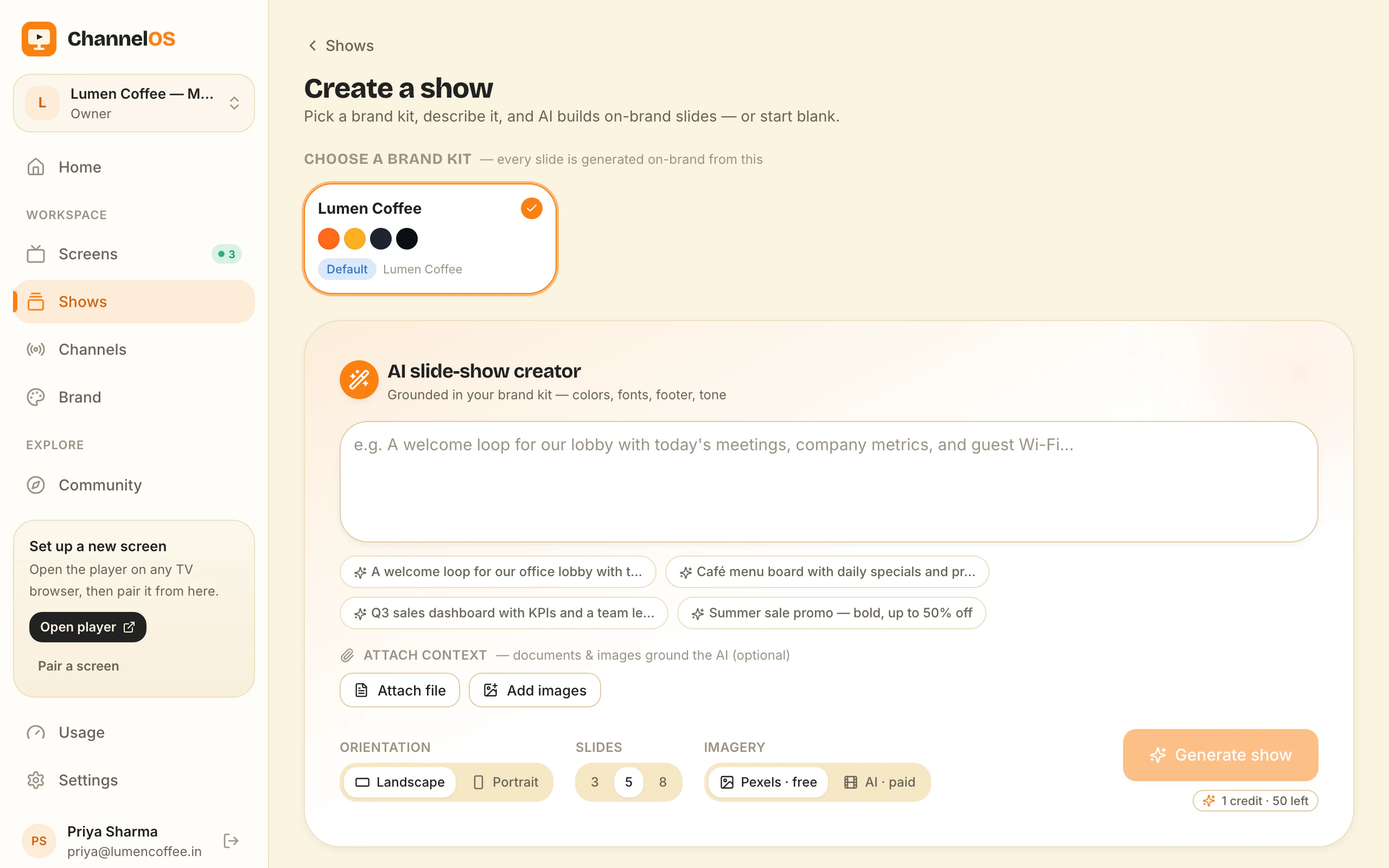
With ChannelOS you pick a subject, goal and look from chips — no prompt-writing — and AI drafts a complete, on-brand, multi-slide show. It reads attached PDFs, images and a webpage URL into slides, and the output is a real editable show in a Canva-style editor: every element selectable, plus one-tap background removal and live clock, weather and QR widgets. It’s a finished first draft, not a single image you then arrange.
Why it matters: most people don’t have a designer. Description-first creation means the whole show exists before you’ve placed a single element.
How fast do changes reach every screen?
NoviSign schedules and remotely updates screens on all paid plans, but content is still published out to the installed players; with ChannelOS, an edit airs everywhere the instant you save it. NoviSign’s advanced scheduling covers date/time windows, remote management, and Outlook/Google Calendar sync on Business Plus and above — solid, but the on-screen player pulls updates as pushed content.
In ChannelOS, what a screen shows is derived from the show plus the channel schedule plus the clock, in real time — there’s no publish-and-wait step. Channels support dayparting (different content by hour and weekday vs weekend, set once) and live takeover (drop an urgent message on every screen, then resume the schedule). Fix a typo on the lunch menu and it’s corrected on every screen at once.
Why it matters: edit once and the whole fleet is right immediately — no per-device sync to wait on.
What does NoviSign cost vs ChannelOS?
As of July 2026, NoviSign licenses per screen — roughly $18/mo (Business), $26/mo (Business Plus) and $44/mo (Premium) on annual billing — with a full-featured 30-day trial but no verified permanent free tier, while ChannelOS makes your first screen free. NoviSign’s key AI and integration features sit on Business Plus and above rather than the base Business plan, and its white-label Partners tier is custom-quoted with a 20-screen minimum.
ChannelOS is priced per screen per month after the free first screen — no seats to count, no setup fees — and because the TV is the player, there’s no player-app device cost or licensing overhead layered on top.
Why it matters: you can prove ChannelOS works on a real screen for free before spending anything, and the AI-first, no-hardware path reaches a finished slideshow with less setup.
Who should still choose NoviSign?
Choose NoviSign if you need deep interactivity and a broad integration catalog that ChannelOS doesn’t aim to match. NoviSign offers 50+ widgets, 500+ templates, touch/interactive signage, connectors like Zapier, Toast POS, PowerBI/Tableau, SharePoint/Drive/Dropbox and calendar sync, plus enterprise controls (SSO, API, approvals, audit logs) on higher tiers and a white-label Partners program for resellers and integrators. If your project is interactive, integration-heavy, or reseller-driven, that maturity is a genuine advantage.
Why it matters: an honest fork beats a fake concession — if you’re buying touch kiosks and data integrations, NoviSign is built for that.
A NoviSign alternative
If you’re looking for a NoviSign alternative, the useful question isn’t “which tool is better” — it’s which part of NoviSign you’re trying to leave behind, because that decides whether ChannelOS is the right swap.
Switch if this is your setup. One to twenty screens in shops, cafés, clinics, gyms, salons or an office floor, showing menus, offers, notices and opening hours — not a touch kiosk, not a live BI dashboard. The person who maintains them is the owner or a duty manager, not an AV technician. And the friction is administrative: a player app to keep current across a mixed fleet of Tizen, webOS, Fire TV and a Windows stick, plus a per-screen licence on screens running a five-slide loop. In ChannelOS that layer disappears — the screen is a page in the TV’s own browser, paired by scanning a code, and the first screen is free. The full argument is in digital signage without an Android player.
Don’t switch if you need what NoviSign is actually good at. Touch and interactive signage. The 50+ widget library and 500+ templates. Connectors — Zapier, Toast POS, PowerBI and Tableau, SharePoint, Drive and Dropbox, Outlook and Google Calendar for meeting-room signs. Enterprise controls like SSO, approval workflows and audit logs. A white-label Partners programme if you resell. ChannelOS has none of those today and isn’t pretending to be close.
What you give up by switching, stated plainly. Those integrations, that template catalogue, and the reseller programme. You also give up an installed player’s local cache: a native player app keeps playing from disk through a network drop, whereas a browser-based screen is a live page — if your screens sit on unreliable Wi-Fi in a warehouse or a basement, weigh that seriously. And there’s no migration importer between the two, so shows are rebuilt rather than exported across. That’s less painful than it sounds — AI drafts a full show from your existing PDF or a webpage URL, and the templates gallery and the free menu board maker with its 14 cuisine layouts give you a running start.
Why it matters: switching platforms is usually sold as a feature win. Here it’s an architecture swap — you trade an integration catalogue for a screen that needs no box behind it and a show that drafts itself.
ChannelOS vs NoviSign: the job
| The job | NoviSign | ChannelOS |
|---|---|---|
| Get a screen live | Install a player app per device, license per screen | Open one URL on the TV, scan a code — live in ~2 min |
| Make a show | AI makes single images; design each slide by hand | Describe it — AI drafts the whole multi-slide show |
| Change what’s playing | Schedule and push updates to installed players | Edit once — it airs everywhere instantly |
| Run the wall | Device Manager and remote monitoring | One live board: play · pause · blank · takeover |
| Setup before pixel one | Account, per-OS player app install, media build | None — pair and publish in minutes |
Feature comparison
| Feature | NoviSign | ChannelOS |
|---|---|---|
| Media-player hardware | Bring-your-own device | Bring-your-own device |
| Free tier | ✗ (30-day trial only) | ✓ (first screen free, with a ChannelOS banner along the bottom of the screen) |
| AI drafts the full show | ✗ (single-image AI only) | ✓ |
| Browser pairing (no app on TV) | ✗ (installs a player app) | ✓ |
| Edit once, airs everywhere | partial (schedule + push to players) | ✓ (derived in real time) |
| Dayparting / scheduling | ✓ (advanced scheduling) | ✓ (dayparting + live takeover) |
| Pricing model | Per screen, ~$18–$44/mo | Per screen, first screen free |
So which should you choose?
Choose NoviSign if you want a mature, integration-rich CMS — touch signage, 50+ widgets, POS/BI/calendar connectors, MCP data workflows, and enterprise controls — and you have the resources to install and manage a player app across your device fleet.
Choose ChannelOS if you want screens live fast, a whole show drafted by AI, and one edit that airs everywhere at once. Your first screen is free. The test: put a real board up, then change it twice in the first week without opening a laptop. If you never reach for it a second time, the screen was not the problem.
Frequently asked questions
- What's the main difference between ChannelOS and NoviSign?
- NoviSign installs a native player app on each TV or media device and authors content in its browser-based NoviSign Studio, with AI limited to generating single images. ChannelOS runs entirely in the TV's own browser, and its AI drafts a complete, editable multi-slide show from a short description.
- Do I need a media player or device for NoviSign?
- NoviSign is bring-your-own-device — no proprietary box — but it does require installing and managing a NoviSign player app per device (Android, Chrome OS, Windows, Tizen, webOS, BrightSign, Fire TV). ChannelOS needs no app at all: you open play.channelos.tv in the TV's browser and pair by scanning a code.
- How does NoviSign pricing compare, and is there a free tier?
- As of July 2026, NoviSign licenses per screen from about $18/mo (Business, annual) up to $44/mo (Premium), with key AI and integrations gated to Business Plus and above, plus a full-featured 30-day trial but no permanent free plan. ChannelOS gives you your first screen free, then charges per screen per month with no seats or setup fees. Free screens show a ChannelOS banner along the bottom of the screen, and any paid plan removes it.
- Who should still use NoviSign?
- Teams that need deep interactivity and a large integration catalog — touch signage, 50+ widgets, POS/BI/calendar connectors, MCP data workflows, SSO and audit logs, or a white-label reseller program — will find NoviSign more mature. ChannelOS is for operators who want a finished show and live screens fast.
- What is the best NoviSign alternative?
- The best NoviSign alternative depends on which part of NoviSign you want to leave behind. If it's the per-device player app and the manual slide-by-slide build, ChannelOS is the closest match: it runs in the TV's own browser with nothing to install, its AI drafts a complete editable multi-slide show from one sentence or an uploaded PDF, and the first screen is free forever. Free screens show a ChannelOS banner along the bottom of the screen, and any paid plan removes it. If what you actually need is touch signage, 50+ widgets, POS and BI connectors, or a white-label reseller program, then another full CMS — not ChannelOS — is the right alternative, because ChannelOS deliberately doesn't build those.
- How hard is it to switch from NoviSign to ChannelOS?
- There is no automated importer between the two, so your content is rebuilt rather than migrated — but rebuilding is the fast part. You describe the show, or upload the PDF or webpage you already have, and AI drafts the slides; the templates gallery and the free menu board maker cover common layouts. On the hardware side there is nothing to migrate at all: you open play.channelos.tv on the same TV, scan the code from your phone, and uninstall the NoviSign player app once you're happy. Most single-screen switches are done in an afternoon; a mixed fleet is limited mainly by how many shows you want to rebuild.
Your screen is two minutes away.
Open the player on a TV, scan the code, publish a show. Your first screen is free.
Free screens show a ChannelOS banner along the bottom of the screen, and any paid plan removes it.