AI menu generator free to use: describe the menu, AI lays out the board
An AI menu generator free to use — type one sentence, or upload a photo or PDF of the printed menu, and AI drafts a complete, editable digital menu board for the TV you already own.
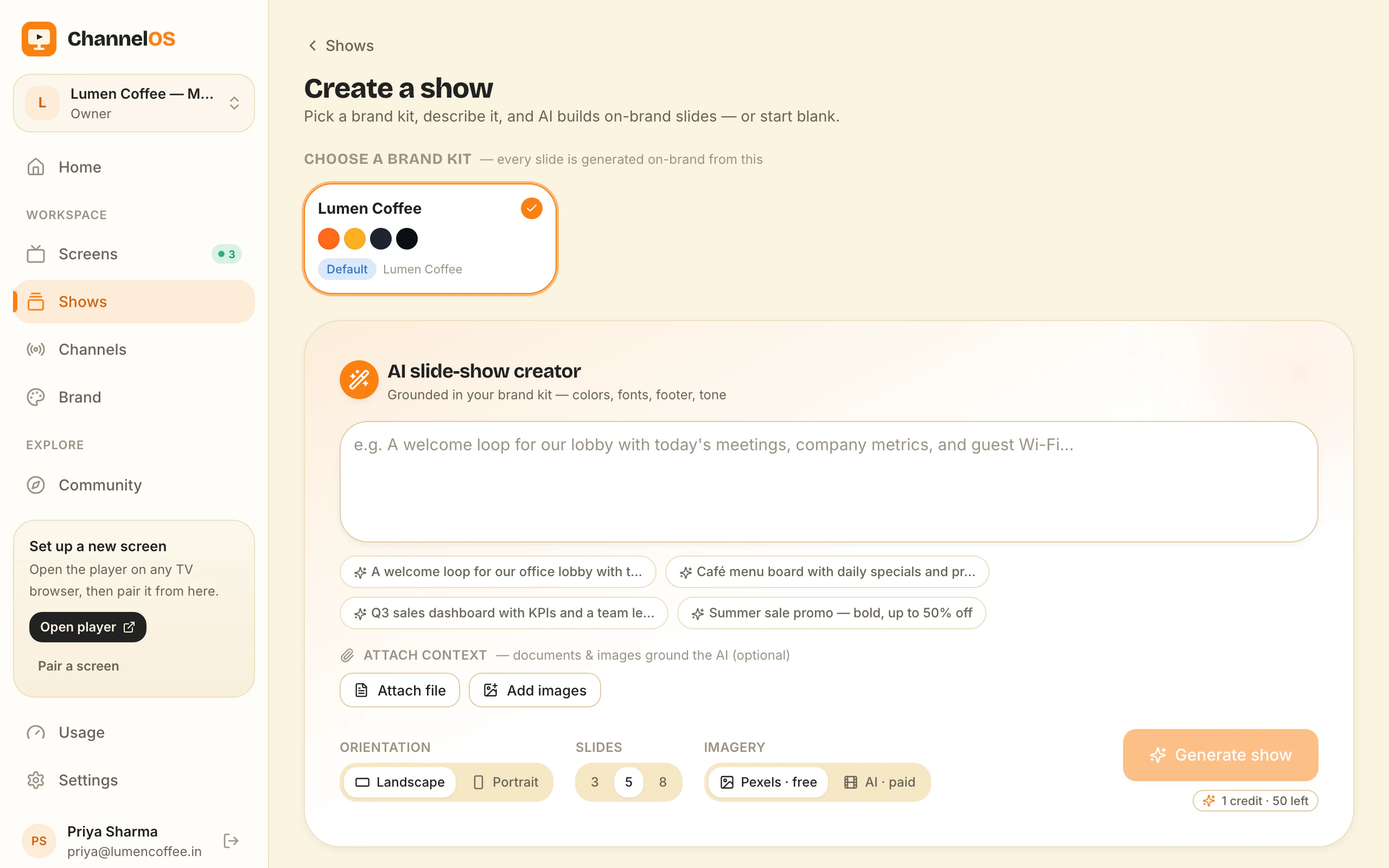
Most people typing “ai menu generator free” into a search box want the same two things: not to retype a menu that already exists, and not to hand over a card before seeing whether the result is any good. That is a fair ask, and it is roughly the whole design brief. Describe the menu — or photograph the printed one, or upload the PDF the printer sent back — and AI lays out the board.
What separates the tools is not the generating. It is what you are holding afterwards.
What an AI menu generator free to use has to produce
A menu board is not a poster with food on it. It has jobs a generic design tool does not know about: prices that line up in a column readable from six metres, sections that survive being split across slides, sizes tied to the right number, and a layout that still works when the TV is 20% further away than you imagined.
So the output matters more than the prompt. There are two kinds:
- A flat file. A JPG, a PNG, a PDF. Perfect for printing, fine for a one-off. When the flat white goes up 20p you go back, retype it, re-export, and walk the file to the screen again.
- A live show. A structured board where every heading, item, price and photo is its own element. A price change is a click, and every screen showing that board corrects itself.
Both are legitimate. The first is a good first day and a poor first year. If the board is going on a TV that you will still be running in six months, the second is the one worth having, and it is the reason we build the generator to output a real editable show rather than an image.
Route one: one sentence, and AI drafts the whole board
The fastest version. Create a show, type what you want in plain words — “evening menu for a small Italian place, six pastas, four wines, warm and dark” — and AI drafts a complete, on-brand, multi-slide board: starters, mains, drinks, laid out for a screen.
You are not prompt-engineering. The draft exists in seconds and the actual work is correcting it: fix two prices, drop a dish, swap a photo. That is a fundamentally different starting position from a blank canvas, and it is why description-first creation gets a board finished that a template gallery does not. AI-first signage covers how the drafting works across every kind of board, not just menus.
Route two: photograph or upload the menu you already have
Your menu is already written. It is a PDF on the printer’s email, a laminated card by the till, or a page on your own website. Retyping it into a design tool is the step worth deleting.
Hand the AI the source instead: upload the PDF, upload a photo of the printed board, or paste a webpage URL. It reads the text, headings, sections and prices out of the document and lays them into a multi-slide board built for a screen rather than for A4 — which usually means fewer items per slide, bigger type, and the drinks list moved onto its own board instead of squeezed into a margin.
This is the route most cafés and restaurants should take, because it starts from something true. The AI is not inventing your menu; it is re-typesetting it.
Where a menu maker AI beats a template, and where it doesn’t
Honest answer: the template wins more often than we would like.
A template wins when you know exactly what the board should say and the design is the hard part; when the menu is short — a coffee list is eight lines, and describing it takes longer than typing it; and when you want a specific look you can see in the gallery. Canva and Adobe Express both do this very well, with far larger libraries than ours and much better print output. If the end product is a printed menu, use them.
A menu maker AI wins when the menu is long and already exists in another format, when the board needs to be built more than once — a new specials board every week never happens if it means opening a design tool — and when the honest alternative is that nobody builds anything and last quarter’s board stays up.
You do not have to choose in advance. The templates gallery and the AI draft land in the same editor and produce the same kind of editable show, so starting from a layout and starting from a sentence converge after step one. How to make a digital menu board walks all three routes end to end, including building from scratch.
The free menu board maker, and its 14 cuisines
If you want something on a screen this afternoon with no account at all, start at the free menu board maker. It runs in the browser, asks for no email and no card, and renders the board as you type so you are correcting a real board instead of imagining one. Download the 1920×1080 result if that is all you need.
There are 14 cuisine presets, each with its own page: pizzeria, sushi, burgers, bbq, chinese, thai, italian, mexican, cafe, bakery, bar-pub, indian, food-truck and dessert. They are separate presets rather than one theme recoloured, because the boards have genuinely different problems. A pizzeria board has to tie every price to a size — the argument at a pizza counter is almost never about the pizza, it is about which size that number belonged to. A bar board lives on the draught list. A food truck has one panel and thirty seconds of attention, so the item count has to come down before the design starts. A bakery sells by the piece and by the box, which is two price columns, not one.
Each preset ships a starter menu of plausible dishes at realistic prices, so you overwrite something real rather than staring at “Item name — 0.00”. There is a QR code built into the tool too: point it at your ordering or booking page and it renders onto the board. The menu board template breakdown goes preset by preset.
What you get back: a show, not a picture
This is the part worth being precise about, because it is where free tools quietly differ.
The generated board arrives as a show — a multi-slide, editable document. Open it in the editor and every heading, item, price and photo is selectable. From there:
- Swap a stock image for your own, or lift a plated dish off its background with one-tap background removal so it sits on your colour. Free Pexels photos and videos are built in.
- Put allergen, calorie or set-menu detail in a table, drawn on the slide and edited cell by cell. Columns read as columns and badly as a text box.
- Add a live clock, a weather widget for the terrace board, a QR widget pointing at your order page, or a ticker line for “kitchen closes 10:30”.
- Group a dish photo with its caption once and they move together after that.
Because the board is structured rather than flattened, the twelfth price change costs the same as the first.
Getting it onto the TV, and keeping it right
The generator is half the job. The other half is the board still being correct in March.
Pairing is one URL opened in the TV’s own browser — Android TV, Google TV, webOS, Fire TV, a Chromebox, or a laptop in kiosk mode — and a code scanned from your phone. no media player box, no per-device licence.
After that, two things do the maintenance for you. Edits are derived, not published: what a screen shows comes from the show plus the schedule in real time, so correcting a price is right on every screen within seconds — there is no publish-and-wait step to forget. And dayparting swaps boards on the clock: breakfast until 11, lunch through the afternoon, dinner at night, with weekends allowed to differ. You set it once. Digital signage for restaurants covers the full room — waiting area, counter, terrace — built out of the same parts.
What “free” actually covers
Three separate free things, and it is worth keeping them apart:
- The menu board maker at /tools/menu-board-maker — no account, no card, download the PNG. Free with no strings.
- Your first screen — free forever, not a trial. One TV running a live, editable, scheduled board at no cost.
- AI drafting — included, with a monthly allowance of AI-built boards; edits you make yourself are unlimited.
Beyond the first screen it is per screen per month, with no seats to count and no setup fee; current rates are on the pricing page. There is no player hardware in that sum, because the TV’s browser is the player.
Start with a sentence or a photo
If you have a printed menu, photograph it and let the AI re-typeset it for a screen. If you have nothing yet, describe it in a sentence, or open the free menu board maker and pick your cuisine. Either way you end up in the same editor, holding a board where every price is still a thing you can click — and your first screen is free.
Frequently asked questions
- Is there an AI menu generator that is free?
- Yes. ChannelOS's free menu board maker at /tools/menu-board-maker needs no account and no card — pick one of 14 cuisines, type your items and prices, and download a 1920x1080 board. If you want AI to draft the whole board from a sentence, a photo or a PDF instead, that runs in the app, where your first screen is free forever. Free screens show a ChannelOS banner along the bottom of the screen, and any paid plan removes it.
- Can AI make a menu board from a photo of my printed menu?
- Yes. Photograph the printed menu, or upload the PDF your printer sent you, and the AI reads the text, headings, sections and prices out of it, then lays them out as a multi-slide board built for a screen rather than for A4. You correct the draft rather than retyping the menu.
- What is the difference between an AI menu generator and a menu template?
- A template gives you a finished layout you fill in; a generator writes the layout for you from what you describe or upload. Templates win when you know exactly what you want and the design is the hard part. A generator wins when the menu is long, already exists somewhere, or you would otherwise never start.
- Does the generated menu board stay editable?
- In ChannelOS, yes — the output is a show, not an exported image. Every heading, item, price and photo is its own selectable element in a Canva-style editor, so changing a price is a click. If your tool exports a flat JPG or PDF, the next price change means regenerating the whole board.
- How do I get an AI-generated menu onto my TV?
- Open one URL in the TV's own browser — Android TV, Google TV, webOS, Fire TV, a Chromebox or a browser stick — and scan the pairing code from your phone. There is no media player box. The screen then derives what it shows from your schedule in real time, so an edit is live everywhere within seconds.
- What is the best menu maker AI for a restaurant TV?
- For a printed menu or a PDF export, Canva and Adobe Express have larger template libraries and better print output. For a TV, the deciding feature is whether the result stays editable and scheduled: ChannelOS drafts the board with AI, keeps every item selectable, and lets dayparting swap breakfast, lunch and dinner on the clock without anyone touching the screen.
Your screen is two minutes away.
Open the player on a TV, scan the code, publish a show. Your first screen is free.
Free screens show a ChannelOS banner along the bottom of the screen, and any paid plan removes it.

